Rebase#
“Rebase vs Merge” is one of the most hotly debated topics in the Git world. A lot of the discussions you’ll see online come down to the fact that many developers (yes, even professionals) don’t understand the purpose of rebase and use it incorrectly, causing a bunch of Git havoc, and then blame the rebase command.
It’s not Git’s fault, it’s a skill issue.
Visualizing Rebase#
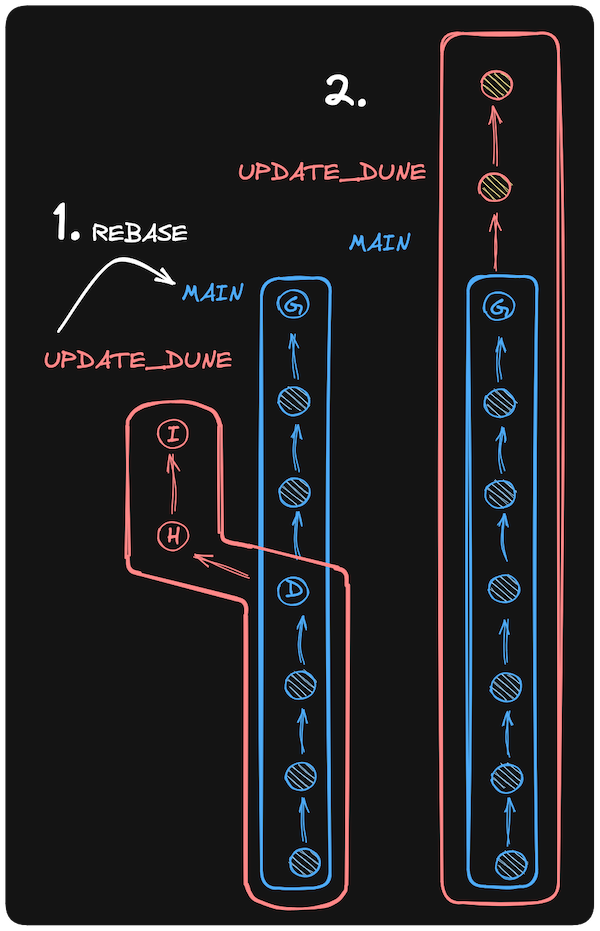
Say we have this commit history:
A - B - C    main
   \
    D - E    feature_branch
We’re working on feature_branch, and want to bring in the changes our team added to main so we’re not working with a stale branch. We could merge main into feature_branch, but that would create an additional merge commit. Rebase avoids a merge commit by replaying the commits from feature_branch on top of main. After a rebase, the history will look like this:
A - B - C         main
         \
          D - E   feature_branch
Run Rebase#
To use rebase to bring changes from main onto a current branch (let’s pretend we’re on one called jdsl), we would run this while on the jdsl branch:
git rebase mainThis will do the following:
- Checkout the latest commit from
maininto a temporary location - Replay each commit from
jdslone at a time onto this temporary location - Update the
jdslbranch to point to the last replayed commit in the temporary location, making this the new permanentjdsl. - The rebase does not affect the
mainbranch;jdslnow includes all changes frommain.